

Connecting Amazon Redshift Database using MuleSoft DB Connector
This blog will showcase how we can set connections with Amazon Redshift Database using MuleSoft Database Connector.
Configuration:
1. We need to add Redshift jdbc Shared Library configuration, Dependency and Repository in POM.

<configuration>
<classifier>mule-application</classifier>
<sharedLibraries>
<sharedLibrary>
<groupId>com.amazon.redshift</groupId>
<artifactId>redshift-jdbc42</artifactId>
</sharedLibrary>
</sharedLibraries>
</configuration>
<dependency>
<groupId>com.amazon.redshift</groupId>
<artifactId>redshift-jdbc42</artifactId>
<version>2.0.0.2</version>
</dependency>
<repository>
<id>redshift</id>
<url>http://redshift-maven-repository.s3-website-us-east-1.amazonaws.com/release</url>
</repository>
2. Now move to the flow and drag a database connector as per the operation needed.In global-element, let's do the configuration for the database.
3. Below are the required Configs:
Connection: Generic Connection
Url: jdbc:redshift://<host>:<port>/<dbname>
DriverClass: com.amazon.redshift.jdbc42.Driver
User: <dbuser>
Password: <dbpassword>
As we have already added the Shared Library configuration, Dependency, and Repository in POM we can find the driver class as mentioned and the JDBC Driver jar is not required.
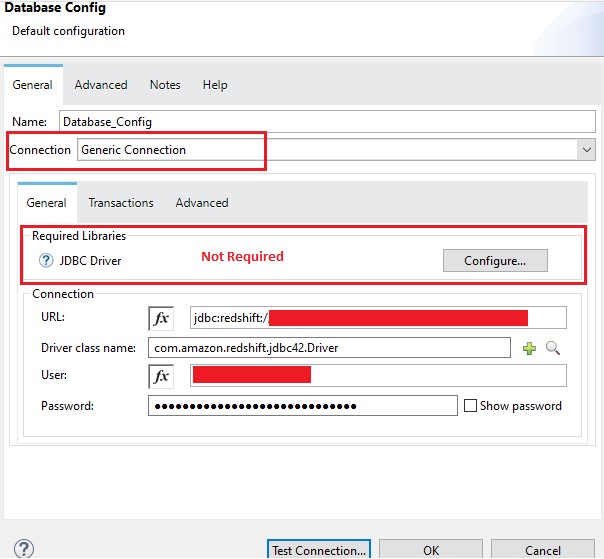
4. Once the configurations are done we can test the connection.
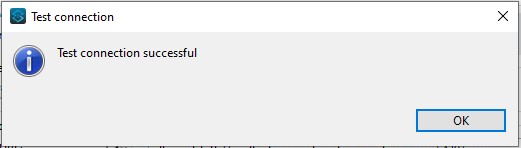
5. As the connection is successful we can perform our required operations.
POM.xml
<?xml version="1.0" encoding="UTF-8"?>
<project xmlns="http://maven.apache.org/POM/4.0.0"
xmlns:xsi="http://www.w3.org/2001/XMLSchema-instance"
xsi:schemaLocation="http://maven.apache.org/POM/4.0.0
https://maven.apache.org/xsd/maven-4.0.0.xsd">
<modelVersion>4.0.0</modelVersion>
<groupId>com.mycompany</groupId>
<artifactId>redshift-db</artifactId>
<version>1.0.0-SNAPSHOT</version>
<packaging>mule-application</packaging>
<name>redshift-db</name>
<properties>
<project.build.sourceEncoding>UTF-8</project.build.sourceEncoding>
<project.reporting.outputEncoding>UTF-8</project.reporting.outputEncoding>
<app.runtime>4.4.0</app.runtime>
<mule.maven.plugin.version>3.8.0</mule.maven.plugin.version>
</properties>
<build>
<plugins>
<plugin>
<groupId>org.apache.maven.plugins</groupId>
<artifactId>maven-clean-plugin</artifactId>
<version>3.2.0</version>
</plugin>
<plugin>
<groupId>org.mule.tools.maven</groupId>
<artifactId>mule-maven-plugin</artifactId>
<version>${mule.maven.plugin.version}</version>
<extensions>true</extensions>
<configuration>
<classifier>mule-application</classifier>
<sharedLibraries>
<sharedLibrary>
<groupId>com.amazon.redshift</groupId>
<artifactId>redshift-jdbc42</artifactId>
</sharedLibrary>
</sharedLibraries>
</configuration>
</plugin>
</plugins>
</build>
<dependencies>
<dependency>
<groupId>org.mule.connectors</groupId>
<artifactId>mule-http-connector</artifactId>
<version>1.7.1</version>
<classifier>mule-plugin</classifier>
</dependency>
<dependency>
<groupId>com.amazon.redshift</groupId>
<artifactId>redshift-jdbc42</artifactId>
<version>2.0.0.2</version>
</dependency>
<dependency>
<groupId>org.mule.connectors</groupId>
<artifactId>mule-db-connector</artifactId>
<version>1.13.6</version>
<classifier>mule-plugin</classifier>
</dependency>
</dependencies>
<repositories>
<repository>
<id>anypoint-exchange-v3</id>
<name>Anypoint
Exchange</name>
<url>https://maven.anypoint.mulesoft.com/api/v3/maven</url>
<layout>default</layout>
</repository>
<repository>
<id>mulesoft-releases</id>
<name>MuleSoft
Releases Repository</name>
<url>https://repository.mulesoft.org/releases/</url>
<layout>default</layout>
</repository>
<repository>
<id>redshift</id>
<url>http://redshift-maven-repository.s3-website-us-east-1.amazonaws.com/release</url>
</repository>
</repositories>
<pluginRepositories>
<pluginRepository>
<id>mulesoft-releases</id>
<name>MuleSoft
Releases Repository</name>
<layout>default</layout>
<url>https://repository.mulesoft.org/releases/</url>
<snapshots>
<enabled>false</enabled>
</snapshots>
</pluginRepository>
</pluginRepositories>
</project>
References:

Thank you for taking out time to read the above post. Hope you found it useful. In case of any questions, feel free to comment below. Also, if you are keen on knowing about a specific topic, happy to explore your recommendations as well.

Create Meaningful Experiences for employees
Our power of choice is untrammelled and when nothing prevents our able to do what we like best every pleasure is to be welcomed and occur that pleasures have to be repudiated.


